Summary: A caregiver operating system should be chosen based on the care setting rather than feature count, as different systems cater to various needs such as home care, nurse registries, assisted living, and family caregiving. The six systems discussed each fit distinct operating models, emphasizing the importance of matching the platform to the specific workflows and coordination needs of caregivers.
The Administration for Community Living said in February 2026 that Phase 1 of its Caregiver AI Prize Competition carried up to $2.5 million in awards, and that money matters to every caregiving operator making platform decisions. Caregiver software is moving beyond task tracking and into operating infrastructure. Picking badly costs more than an ugly dashboard. Staff scheduling, family communication, compliance work, incident reporting, and care notes can all drift back into side channels when the system does not fit.
A caregiver operating system should be chosen based on the care setting before considering the feature count. Home care, nurse registry operations, assisted living, and family caregiving use similar language, but they do not run the same workflow or answer to the same buyer. That difference is why a feature checklist can mislead people who are really buying around staffing patterns and daily coordination.
The six options below are not a universal winner list. Each one fits a different operating model. So the useful question is not which platform sounds most complete, but which one fits the work your caregivers already have to coordinate.
1. AlayaCare: home care at scale
AlayaCare describes itself as the intelligent operating system for home care, with a focus on helping providers deliver better outcomes at scale. The clearest fit is a home care organization that needs its core system to support growth rather than sit beside care delivery as an administrative add-on.
AlayaCare stands out because its positioning joins two ideas that buyers often separate, care outcomes and operating scale. A founder evaluating this category should read that as a bet on larger home care providers, not on a lightweight family coordination app or a single-purpose scheduling tool. That framing matters because the product promise points toward an agency that expects the software to carry real operational weight.
The trade-off is scope. A platform built for home care scale deserves diligence around implementation workload, data migration, and staff adoption, because an operating system only works when field teams use it as the primary record. The next comparison point is whether the buyer is an agency, a registry, or a more specialized care setting.
2. SwyftOps: agencies and nurse registries
SwyftOps positions itself as a secure home care operating solution for agencies and nurse registries. The strongest fit is an organization where credentialed caregivers, shift coverage, client records, and registry-style operations all need to live in one system.
SwyftOps stands out for naming nurse registries directly, because many caregiver platforms speak broadly about home care without spelling out that operating model. Buyers running a registry should treat that explicit positioning as a reason to ask deeper workflow questions during demos, especially around assignment rules, documentation, and the daily handoff between office staff and caregivers. The language is specific enough to matter, since registry work tends to break when the software assumes a standard agency flow.
The security language also matters for healthcare operators that need vendors to take protected information seriously, but security claims still need contract review. A practical buyer should ask for documentation, access controls, and data handling terms before letting the platform become the daily system of record.
3. AxisCare: growth-minded home care teams
AxisCare publishes a customer testimonial saying that upgrading the operating system with AxisCare was instrumental to growth. The platform fits home care teams that see their current software as a constraint on expansion rather than a neutral back-office tool.
AxisCare stands out because the quoted proof point is not framed around one isolated feature. The testimonial language speaks to an operating system upgrade, which is the right category for buyers replacing a patchwork of scheduling, documentation, and internal communication tools. That kind of quote usually points to a broader workflow change, not a single nice-to-have screen.
A growth-oriented operator should still separate testimonial value from product fit. A strong reference does not prove that the same workflow will match a different agency, payer mix, or staffing model. AxisCare belongs on the shortlist when the buying team can define the growth bottleneck clearly enough to test it during a demo.
4. Agency Caregivers: one platform for agency operations
Agency Caregivers is presented as an agency operating system, one place where a caregiver agency can run the business from end to end. The strongest match is an agency buyer that wants a main system instead of a stack of separate tools for different tasks.
Agency Caregivers stands out because of how wide that promise runs. The phrase entire caregiver agency points to platform-level ambition, and that matters to owners who are tired of matching up data across spreadsheets, message threads, and software that does not talk to the rest.
The risk sits in that same breadth. A broad agency platform has to survive the ugly details of how the work actually happens, from caregiver onboarding to visit changes, client communication, billing handoffs, and management reporting. Agency Caregivers deserves attention when consolidation is the goal, but the demo should follow real agency workflows, not a generic tour of screens.
5. CareOS: assisted living operations
CareOS is described as an operating system for assisted living, bringing resident care, staff scheduling, compliance, incident reporting, and food operations into one platform built for that setting. The best fit is an assisted living organization that needs care work and facility operations to sit on the same operating layer.
CareOS stands out because assisted living is not home care with a building attached. Resident care, staff scheduling, compliance, incidents, and food operations create a different operating setting, and a platform built for that environment should be judged on how well those functions connect.
Specialization comes with a trade-off. A purpose-built assisted living platform has real value when those workflows sit at the center of the business, but it is a poor first stop for a home care agency or a family member arranging care at home. Buyers should settle the care setting first, then compare feature breadth.
6. careOS: shared organization for family caregivers
careOS says it is an operating system for caregivers, giving people one place to organize and share everything tied to someone's care. The best fit is a caregiving circle that needs shared context rather than a formal agency management system.
CareOS stands out because its wording points to coordination around a person, not the running of a provider business. That difference matters when siblings, relatives, friends, or aides need a shared place for care information and communication.
The platform should be judged on clarity and participation, not enterprise depth. Family-facing systems only work if nontechnical users keep the information current, so the buyer should test whether the most time-pressed caregiver in the circle would actually use it. This option belongs in a different lane from agency or assisted living operating systems.
The six platforms compared by care setting
Each platform below is matched to the care setting its own positioning names, so buyers can shortlist by operating model first.
| Platform | Care setting | Best fit |
|---|---|---|
| AlayaCare | Home care | Home care organizations that need the core system to support growth at scale |
| SwyftOps | Agencies and nurse registries | Registry-style operations with credentialed caregivers and shift coverage |
| AxisCare | Home care | Growth-minded teams replacing a patchwork of scheduling and documentation tools |
| Agency Caregivers | Caregiver agencies | Agencies that want one main system instead of a stack of separate tools |
| CareOS (givecareos.com) | Assisted living | Facilities joining resident care, staff scheduling, compliance, incidents and food operations |
| careOS (careos.care) | Family caregiving | Caregiving circles that need shared information around one person's care |
How to choose between caregiver operating systems
The first filter should be the operating environment: home care, agency or registry, assisted living, or family coordination. A buyer who starts with feature lists will see the same words repeated across vendors, but the daily work behind those words changes by setting.
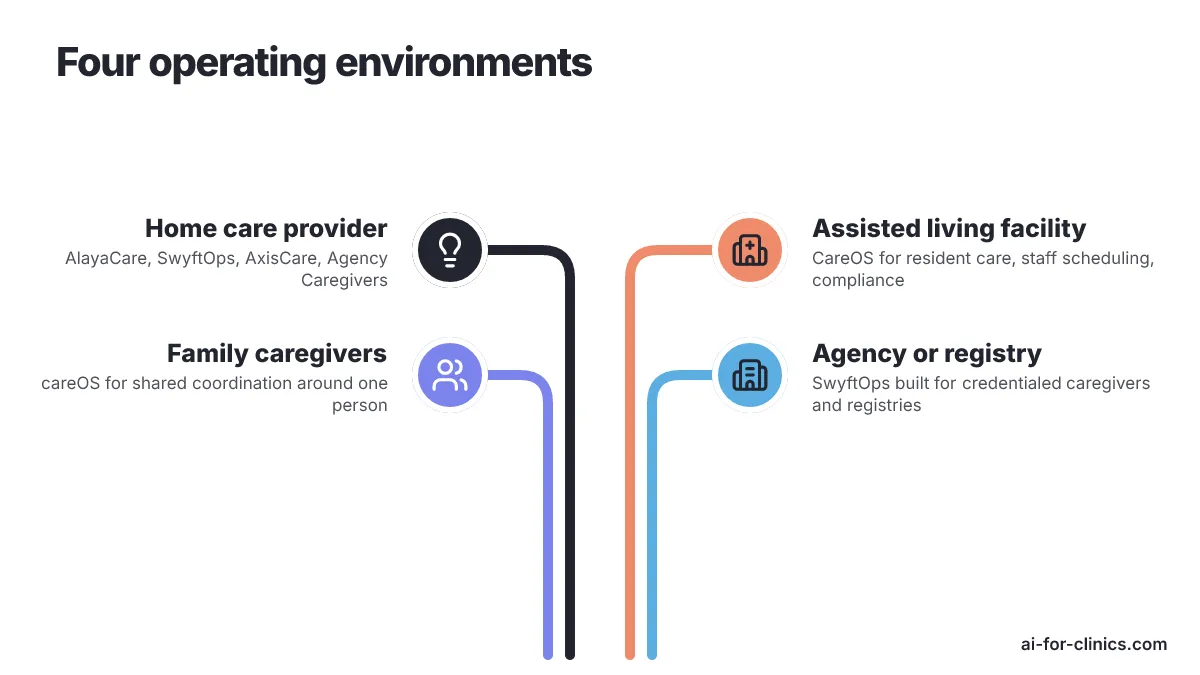
A home care provider comparing AlayaCare, SwyftOps, AxisCare and Agency Caregivers should bring a workflow map into every demo. The map should show:
- how a referral becomes a client
- how a caregiver is assigned
- how a visit change is handled
- how care notes reach the office
- how management sees performance
A vendor that cannot walk through those steps in the buyer's language is not yet proven as an operating system.
An assisted living buyer should test CareOS against building-level work, not just care documentation.
A family caregiving buyer should treat careOS as a coordination tool for shared information around one person's care. A single household coordinating unpaid relatives should not start with agency or assisted living platforms unless the caregiving arrangement has become a managed provider operation with staff, compliance obligations and administrative workflows.
Market timing also belongs in the buying process. In July 2026, Empathy announced Caregiving Support for families, following its leave-support launch and aiming at long-term care coordination. In July 2026, Electronic Caregiver and HCUnity announced a longitudinal care platform expansion connecting Addison Care with care coordination, operational intelligence and longitudinal care management infrastructure.
The family-care side of the category is moving quickly too. In March 2026, simPAL Solutions announced a Caregiver OS early-access release inside its MARly App for home care coordination, medication tracking, tasks and early warning signs. The Administration for Community Living's February 2026 prize launch points in the same direction: responsible AI for caregivers is becoming a funded policy interest, not just a product tagline.
Vendor diligence should translate those signals into buying questions:
- Ask whether the platform is built for professional operations, family coordination or facility workflows.
- Ask what data becomes the source of truth, who updates it, who sees it and what happens when a caregiver misses a step.
- Ask which workflows are native to the platform and which require outside tools.
AI for Clinics is Clinsight's directory of U.S. healthcare startups, so its strongest use here is market mapping rather than replacing a buyer's RFP. Readers comparing adjacent categories can use the AI for Clinics About page to understand how the directory frames startup discovery by healthcare vertical and state.
A broader healthcare vendor map should keep category boundaries clean. Because Patients First Dentures & Implants is outside this software shortlist, it should not be evaluated as a caregiver operating system vendor.
Next steps before booking vendor demos
Start with a one-page workflow map before booking vendor demos. Name the care setting, the people who touch the work, the current tools they use and the handoffs that break most often. That document will quickly separate a real operating system fit from a platform that only borrows the language.
The next step is to give each shortlisted vendor the same scenario and ask them to walk it through without skipping the awkward parts. Watch where the system becomes the source of truth, where staff still need side notes and where implementation would require changing the operation. Stop the process when the product cannot match the buyer's care setting, because a caregiver operating system is not valuable unless it runs the work people actually do.
Frequently Asked Questions
What is a caregiver operating system?
A caregiver operating system is a software platform designed to support the specific workflows and coordination needs of caregivers in various care settings, such as home care, nurse registries, assisted living, and family caregiving. It goes beyond simple task tracking to provide an infrastructure that supports the daily operations of caregiving.
How do I choose the right caregiver operating system for my needs?
To choose the right caregiver operating system, start by identifying your care setting, whether it's home care, agency or registry, assisted living, or family coordination. Focus on how well the system supports your specific workflows and coordination needs, rather than just the feature list. Consider how the platform integrates with your existing processes and whether it can handle your operational requirements.
Why is it important to match the caregiver operating system to the care setting?
Matching the caregiver operating system to the care setting is crucial because different care environments have distinct workflows, coordination needs, and buyer expectations. A system that fits one setting may not work well in another, leading to inefficiencies and increased costs. The right match ensures that the platform supports the specific tasks and processes of the care environment, improving overall effectiveness.
What makes AlayaCare suitable for home care organizations?
AlayaCare is suitable for home care organizations because it focuses on delivering better care outcomes at scale. It integrates care delivery with operational needs, making it ideal for larger home care providers that require a robust system to support growth. The platform is designed to carry real operational weight, making it more than just an administrative add-on.
How does CareOS differ from other caregiver operating systems?
CareOS is specifically designed for assisted living operations, integrating resident care, staff scheduling, compliance, incident reporting, and food operations into one platform. It differs from other systems by focusing on the unique needs of assisted living environments, rather than home care or agency operations. This specialization ensures that the platform supports the specific workflows and operational requirements of assisted living facilities.
Is a family caregiving app the same as agency software?
No. A family-facing platform such as careOS is built for coordination around one person's care, while agency platforms such as AlayaCare, SwyftOps, AxisCare and Agency Caregivers are built to run a provider business. A single household coordinating unpaid relatives should not start with agency or assisted living platforms unless the arrangement has become a managed provider operation with staff, compliance obligations and administrative workflows.
What should I ask vendors during a demo?
Give each shortlisted vendor the same workflow scenario and ask what data becomes the source of truth, who updates it, who sees it and what happens when a caregiver misses a step. Also ask which workflows are native to the platform and which require outside tools.